
API request node
API request node performs a REST API request whose configuration is defined inline on the node itself.
It is a convenient alternative to the Call tool node: instead of referencing a named Tool, you configure the HTTP method, URL, headers, body and authentication directly in the node’s settings. Use the API request node for a one-off call that does not need to be reused; use the Call tool node when you want to invoke a reusable, named tool (or an MCP tool).
The LLM is used to determine the request parameters (when any are defined) and, optionally, to extract variables from the response. When no parameters are defined, the node runs without involving the LLM.
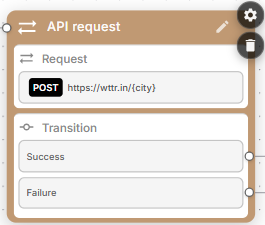
Transitions
The API request node has two transitions:
- Success – taken when the request completes successfully.
- Failure – taken when the request fails (for example, an HTTP error response).
You will typically want to wait for the response before proceeding so that you can branch on success vs. failure, consume the response in the next conversation node, or extract variables from it. Alternatively, you may disable Wait for response (see below) to fire the request in the background.
Extract variables
The API request node may be optionally configured to extract variables from the response. To enable this functionality, turn on Extract variables in the node settings; an “Extract variables” section is then added to the node card. Use it to configure the variables extraction.
For each variable you define a name, type and description. Make sure to provide a meaningful description, as it is used by LLM to populate the variable’s data.
You may discard the response after extracting variables from it, shrinking the context and reducing the agent runtime cost.
Using jq or JMESPath statements
If your API returns data in JSON format, you may extract variables from it using jq (JSON query) or JMESPath statements. Compared to the standard variables extraction method that uses LLM prompting, this is much faster and requires no LLM involvement.
You may specify the statement in the variable’s Description field; a statement that starts with . is evaluated as jq, anything else as JMESPath. For example:
- Name:
user_name - Type:
string - Description:
.data.user_name
You may use complex statements if needed. For example the following looks up array element by username attribute and extracts data from its phone attribute:
.[] | select(.username == "{user_name}") | .phoneYou may also reference existing variables in your statements, these will be expanded with real values prior to statement evaluation. The above example demonstrates this by referencing the {user_name} variable.
JMESPath statements can use the from_utc() and to_utc() helper functions, which convert timestamps to / from the timezone given by the timezone variable.
Capturing complete response
You may use a special {} syntax in variable description to capture the complete response. You can later extract data from this variable using jq or JMESPath syntax, see Using jq or JMESPath statements in the Extract variables node for a detailed description.
API request node settings
- Type –
RESTmakes an HTTP request (the default).Flowruns a flow to completion instead, returning the variables it added or changed; in this mode the request-side fields below are replaced by a Flow selector. See Flow tools. - Method – HTTP method to use:
GET,POST,PUT,PATCHorDELETE. - URL – Request URL. May reference
{...}variables or parameters. - Headers – Request headers. May reference
{...}variables or parameters, for exampleapi-version: {api_version}. - Content – Request body. May reference
{...}variables or parameters. If left empty, all parameters not referenced in the URL or headers are included. Hidden forGETandDELETEmethods. - Auth type – Authentication method:
None– no authentication.Basic– Username and Password.Bearer– Bearer key.OAuth2– OAuth2 client ID, OAuth2 client secret, OAuth2 token URL and OAuth2 scope.
- Parameters – Request parameters filled in by the LLM at runtime. Leave empty for a fixed request. See Parameters below.
- Wait for response – Wait for the response before proceeding to the next node.
- Discard response – Discard the response from the conversation history. Available only when Wait for response is enabled; typically combined with variables extraction.
- Timeout (sec) – Request timeout in seconds (default
10). Not applicable to theFlowtype. - Max response length – Maximum response length in bytes (default
100000). - Message before request – Optional message played to the user before the request is performed.
- Extract variables – Extract variables from the response.
- Custom LLM – Define a custom large language model (primary and fallback), temperature and max output tokens to be used for this specific node.
- Global node – Enables transition to this node from any other node in the flow; define the Global condition that triggers the transition.
- Logging – Enable or disable logging for this node (
inherit,enabled,disabledormasked).
Parameters
The optional Parameters list defines values that the LLM fills in at call time (for example, a city extracted from the conversation). Each parameter has a Name, a Type (str, int, float, bool or the corresponding list[...] variants), a Required flag, and a Description that the LLM uses to populate the value.
Reference parameters – and any flow variables – inside the URL, Headers or Content by enclosing their names in curly brackets, for example https://wttr.in/{city}. Any parameter that is not referenced in the URL or headers is added to the request body automatically when Content is left empty.
When no parameters are defined, the node runs as a fixed request without any LLM involvement.